Skip to content
Introduce

Your church's screen, without the panic.

On screen

Free church presentation software for lyrics, Bible verses, announcements and video, run from a single window. Built for whoever is at the desk on Sunday, even if they learned it two weeks ago.

Try the screen above: and change slides, B turns it black. They are the same keys as in the app.

Download for Mac

Free. macOS 12 or later.

A Sunday at the desk

From putting the service together the night before to switching the projector off. The screenshots show the app in Spanish; it runs in English too.

Saturdaypm

The service comes together in one list

Songs, passages, videos, pictures, announcements and the points of the sermon, in the order of the service. Drag to reorder, and duplicate last Sunday to start the next one.

Songs from another program
ProPresenter 4 to 7, OpenLP, SongSelect, ChordPro or plain text. You review them one by one with the lyrics alongside, and duplicates stay out.
A new song
Paste lyrics copied from anywhere and the app suggests where each slide should break.
PowerPoint
Sermon slides come in as text, or as pictures exactly as they look if the computer has LibreOffice.
The sermon, point by point
A title and its points, each on its own slide.
Find anything with ⌘K
Songs, passages, designs and actions from one place.
Photos and videos
The church's library, showing how much room is left before you upload.
No internet, no problem
Create, copy and delete services offline. The changes go out by themselves, in order, when the network is back.
The whole team
People ask to join the church and an administrator approves them. Songs, designs and colours belong to everyone.
Saturdaypm

Designs that read from the back row

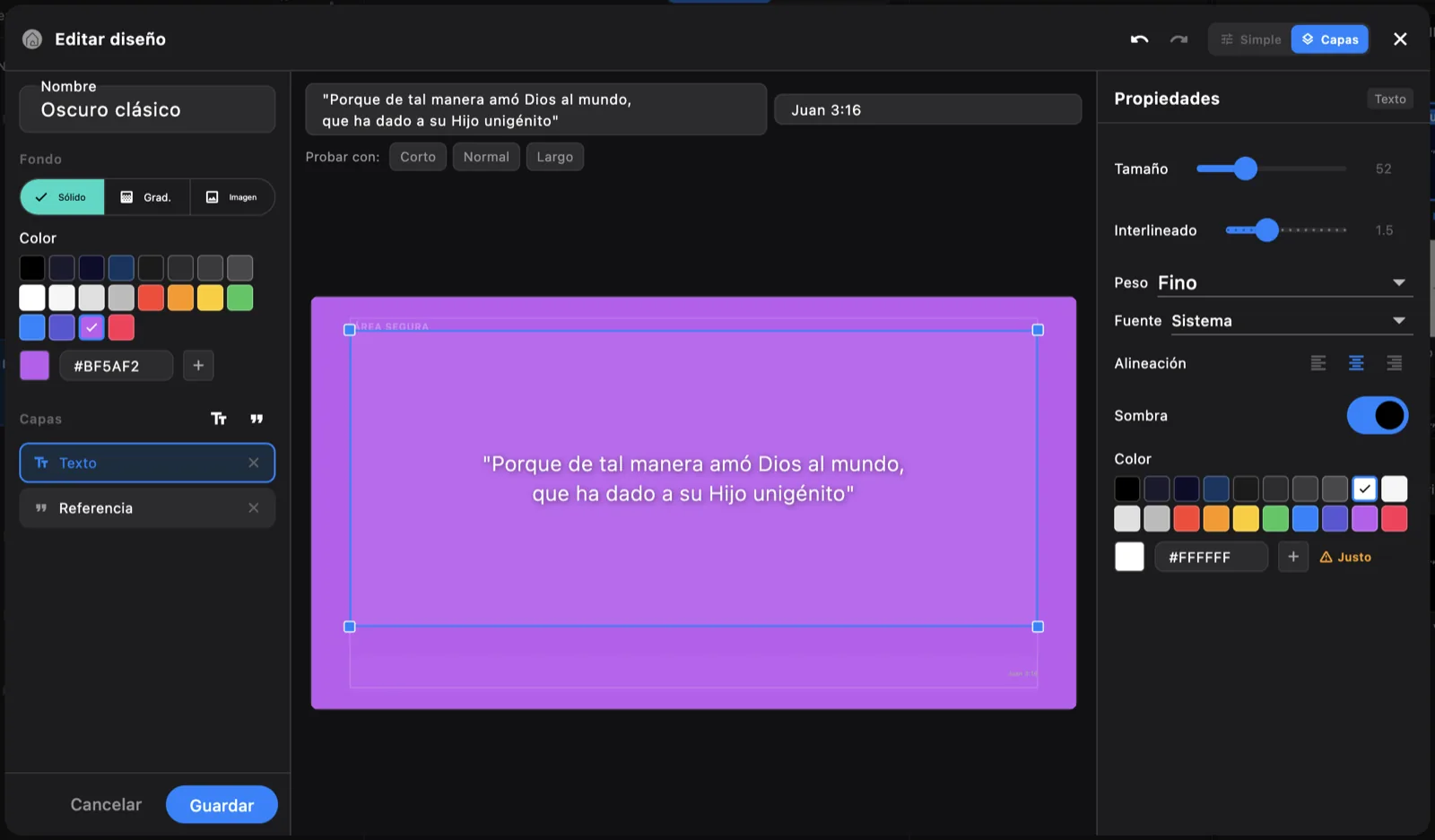
A solid colour, a gradient, a photo or a looping video. Typeface, size, line spacing, margins, shadow and transition. A simple mode to go fast, and a layers mode with a canvas, guides and snapping to place every block by hand.

Real contrast
The editor warns you when the words will not read, measuring the photo behind them too.
Text that fits
A long psalm shrinks to fit instead of running off the bottom edge.
Colours from the photo
The photo offers its own palette, and the church keeps its colours for every design.
Undo
⌘Z and ⇧⌘Z, and the app asks before closing with unsaved changes.
Moving backgrounds
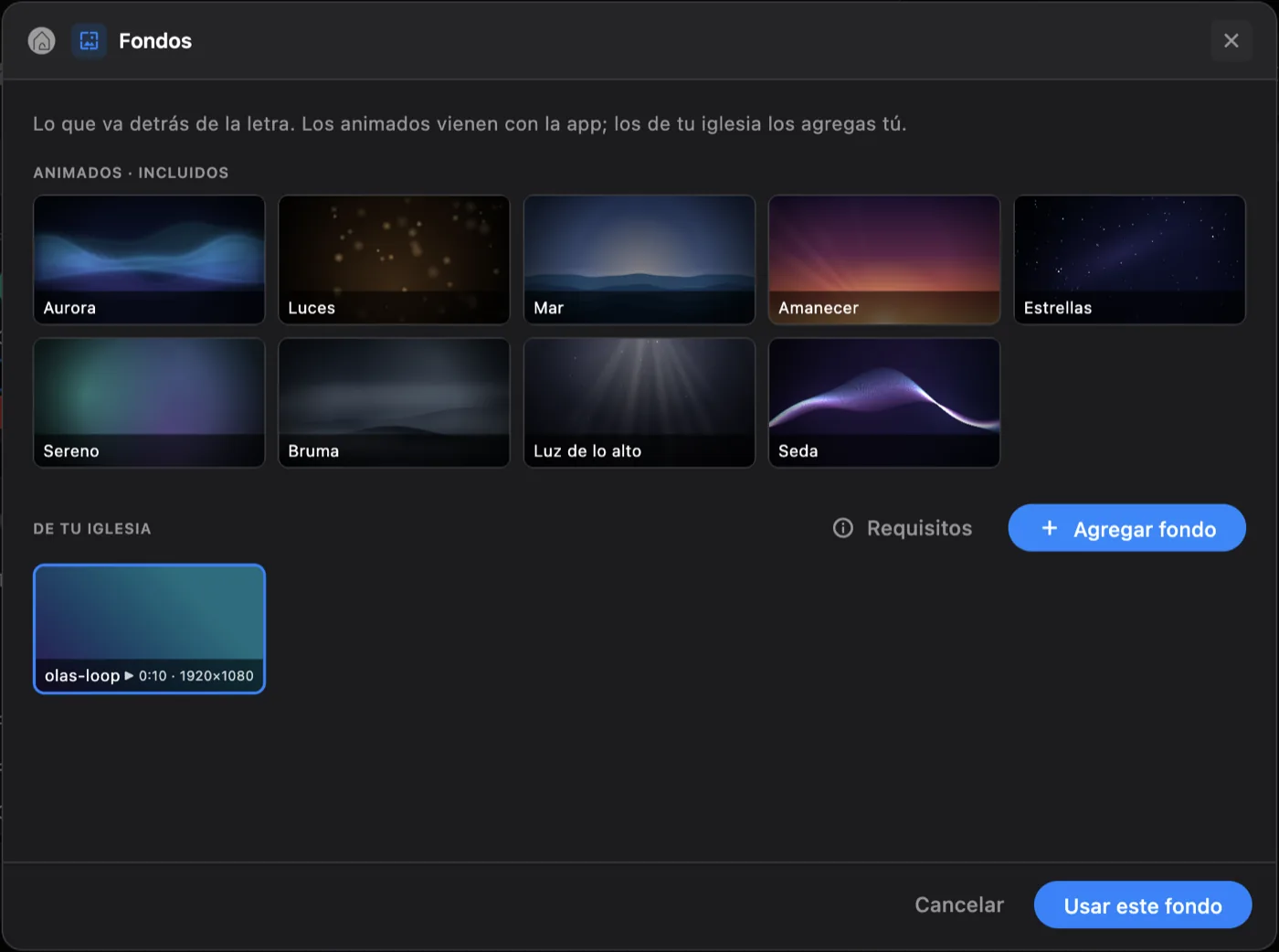
Nine scenes built in that weigh nothing and need no internet, plus the church's own pictures and videos.
Videos without internet
The first Sunday a video is used it is kept on the computer, and plays from there with no network.
The design editor in layers mode, with the canvas, the guides and the safe area

Sundayam

Plug everything in, and that is it

Choose once which screen it projects to, and the app remembers. If the church's internet is down, the service starts anyway: everything prepared is already on the computer.

Waiting screen
An animated scene with the church's name, a message and the time or a countdown. W puts it up and takes it down.
Stage display
A separate window for the preacher and the musicians: what is up, what is next, and messages from the desk.
A phone as a remote
Any phone on the same Wi-Fi, with no internet and nothing to install: scan a QR code and type the PIN. It is remembered for next Sunday.
Closed until you open it
Phone control is off until someone turns it on. Changing the PIN disconnects every phone.
A window for the livestream
Just the lyrics over green, blue, magenta or black, at the top or the bottom, on a bar or outlined. Capture it in OBS with a Chroma Key.
In Spanish or English
It asks the first time. The projector and the stage display speak the same language as the desk.
The background picker with the nine built-in animated scenes and one of the church's own

Rehearsalam

One run with the band, and the plan is done

Run the service from start to finish and the app times every item. At the end, tick the times to keep as the plan for the service.

Not counted for licensing
What goes on screen during rehearsal stays out of the report.
A set list for the musicians
Exported as text, with the lyrics and whatever chords each song has.
A service in one file
Lyrics and designs inside, to move it to the computer at the desk or to another campus.

Worshipam

Nobody sees the wrong slide

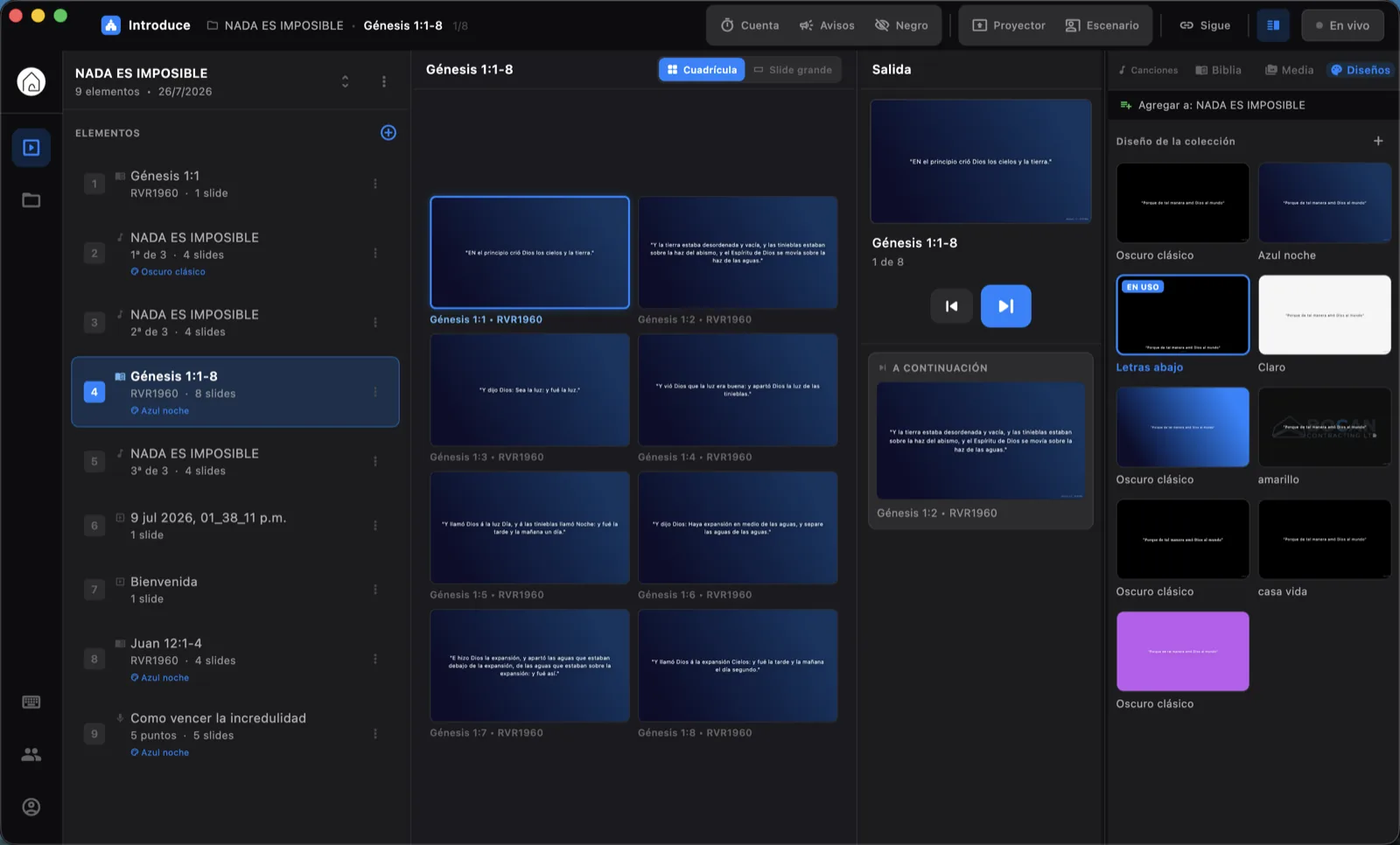
What comes next is in view, and the screen changes when the band reaches the chorus, not before. It all runs from the keyboard.

Change slides
or Space. The numbers 1 to 9 jump to that item in the list.
Look without cutting
With K the screen holds still while the cursor moves. Enter sends what you are looking at.
Black
B turns the screen black. Esc only uncovers it: it never cuts the projector.
Big slide
G swaps the grid for the slide going out, large.
The background keeps going
A moving background carries on from slide to slide. Only the words change.
If the network drops
The app says it cannot reach the server instead of going quiet, and the service carries on.
The operator console: the running order on the left, the slide grid in the middle and the output with what comes next on the right

Sermonam

The sermon runs long, and the team knows

A verse that was not in the list is four keys away: V, “jn 3:16”, Enter. The Bible built in is the Reina-Valera 1960, the Spanish text, complete and offline.

Announcements over the slide
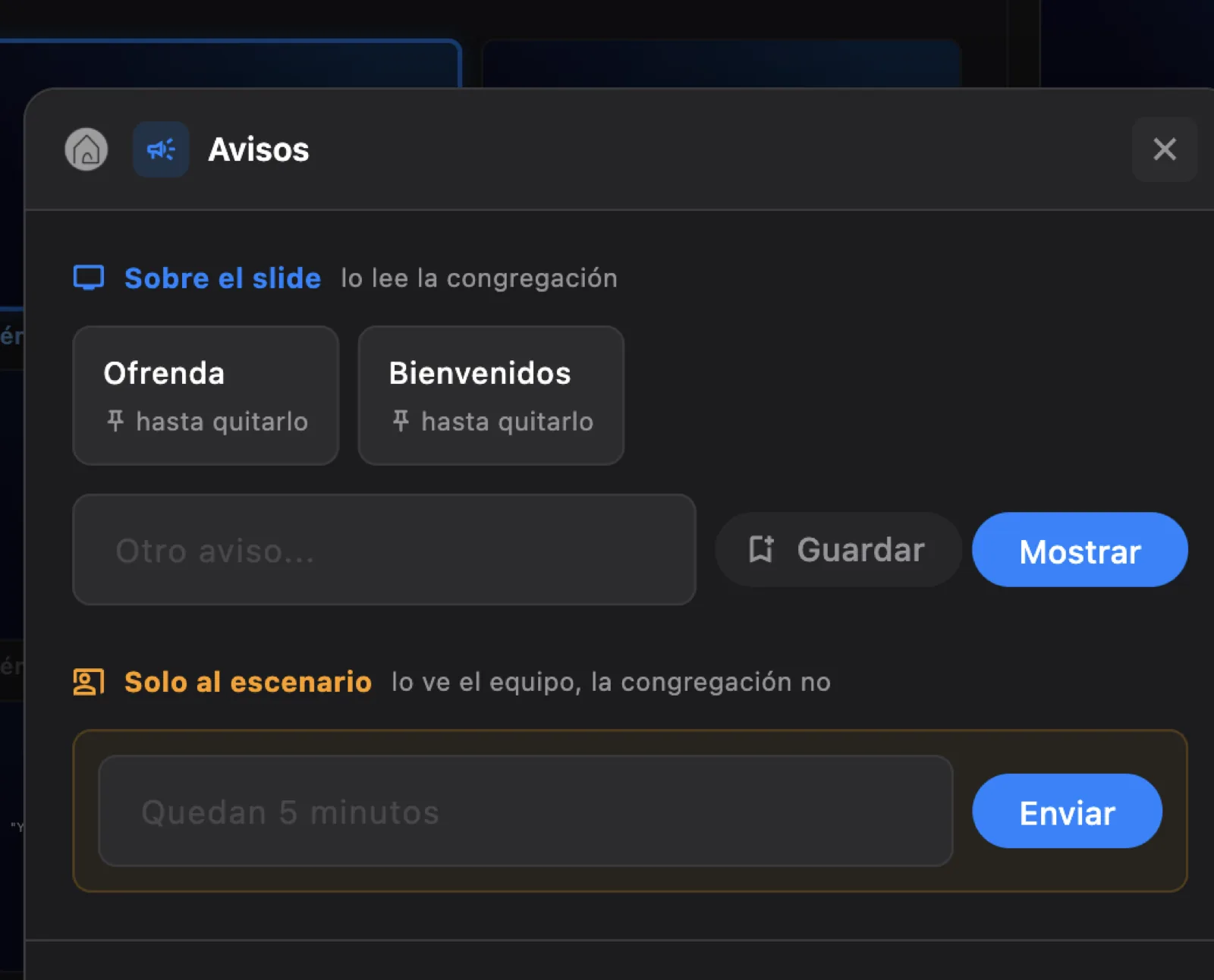
“Children to the classroom,” with a timer so it clears itself. The ones that repeat every Sunday are one click away.
For the stage only
“Five minutes left”: the preacher sees it, the congregation does not.
Free slide
Last-minute text, in the service's design.
The Bible at hand
Browse by book or type the reference straight in: “sal 23”, “jn 3:16”.

4:42 / 4:00 +0:42 Each item counts its time against the plan, at the desk and on the stage display: amber as it gets close, red once it runs over.

The announcements dialog with two saved announcements and the message for the stage

Afterwardspm

The service ends, the report is ready

What went on screen is logged by itself. Next Sunday starts by duplicating this one.

History
Every service and what was projected, by week, month, quarter or year.
Licence report
The songs used, with their CCLI numbers, counted per service. Anything on screen under five seconds does not count. Exports to Excel.
Backup
The whole service saved in a file that does not depend on the server.

Download Introduce

  • macOS

    Version 1.0.1, in Spanish or English. Apple Silicon and Intel, macOS 12 or later.

    Download for Mac
  • Windows

    Beta: it has not been tried on a real computer yet. If you try it, tell us how it went. Windows 10 or 11.

    Download beta
  • Linux

    After Windows.

    On the list

Installing on a Mac

  1. Unzip the file and drag Introduce to Applications.
  2. Open it. macOS says it cannot verify it: click Done.
  3. In System Settings, Privacy & Security, click Open Anyway.

Only the first time. The app is not signed with an Apple certificate yet. When a new version is out, the app says so.

Installing on Windows

  1. Unzip the file and open the Introduce folder.
  2. Run Introduce.exe.
  3. If Windows says it protected your PC, click More info, then Run anyway.

Questions

How much does Introduce cost?

It is free to start. Download it without paying, create your church's account, and no card is asked for.

Is it an alternative to ProPresenter?

Yes, built for what most churches have: one computer, one projector and volunteers. It imports songs from ProPresenter 4 to 7, and from ProPresenter 7 it brings the groups and the chosen arrangement.

Does it work without internet?

Yes. The service starts and projects with no network: the Bible, the designs, the backgrounds and the videos already used are on the computer. Anything prepared offline goes out by itself when the connection is back. You need a connection to create the account and share with the team.

Which Bible does it include?

The complete Reina-Valera 1960, the Spanish text, inside the app and offline. Browse by book or type the reference, such as “jn 3:16” or “sal 23”.

What computer do I need?

A Mac with macOS 12 or later, Apple Silicon or Intel. For Windows 10 or 11 there is a beta that has not been tried on a real computer yet; Linux comes after.

Does it work for livestreaming?

Yes. It opens a window with just the lyrics over green, blue, magenta or black, which you capture in OBS and key over the camera with a Chroma Key or Luma Key filter.

Can I use two screens?

Yes. The projector goes to the screen you choose and the app remembers it. The stage display opens in another window, for the preacher and the musicians.

Can I change slides from my phone?

Yes, from any phone on the same Wi-Fi, with no internet and nothing to install. Turn it on in the app, scan the QR code and type the PIN.

Can several people at the church use it?

Yes. People ask to join the church's organization and an administrator approves them. Songs, designs and colours are shared.

Is it in English?

Yes, in Spanish or English. It asks for the language the first time, and you can change it later in Settings.

Built in a church, for churches.

Everything it does exists because something went wrong on a Sunday. If your team is missing something, ask for it.